
Automatic Retry & Rerouting
When and how payments are retried or rerouted
Payment processing doesn't always succeed on the first attempt. Temporary issues like network timeouts or system unavailability can cause initial failures, while scheme limitations or regulatory restrictions may prevent processing on the preferred rail.
The nature of instant payment schemes allows us to offer automatic retries for temporary issues and rerouting to alternative rails when the preferred rail is unavailable. These capabilities rely on real-time processing and immediate feedback, which are not possible with traditional batch-based systems.
We currently offer the following features for SEPA Instant payments only.
Automatic Retry and Rerouting Process
If payment processing on SEPA Instant is not possible, the payment will automatically be retried or rerouted:
Automatic retries handle temporary issues that may prevent immediate payment processing, such as network timeouts or temporary system unavailability. When these transient problems occur, the system will automatically retry the payment on the same rail at regular intervals before considering alternative approaches.
Automatic rerouting occurs when a payment cannot be processed through the preferred rail due to more fundamental limitations, such as scheme-specific restrictions, regulatory requirements, or transaction amount limits. In these cases, the routing logic automatically attempts to process the payment through alternative payment rails according to your configured priorities, either through the default logic or through your specified scheme selection override or prioritized clearing networks list.
Both mechanisms work together to maximize payment success rates while providing you with visibility into how your payments are being processed and why certain routing decisions were made.
The following diagram illustrates how automatic retries and rerouting work together:
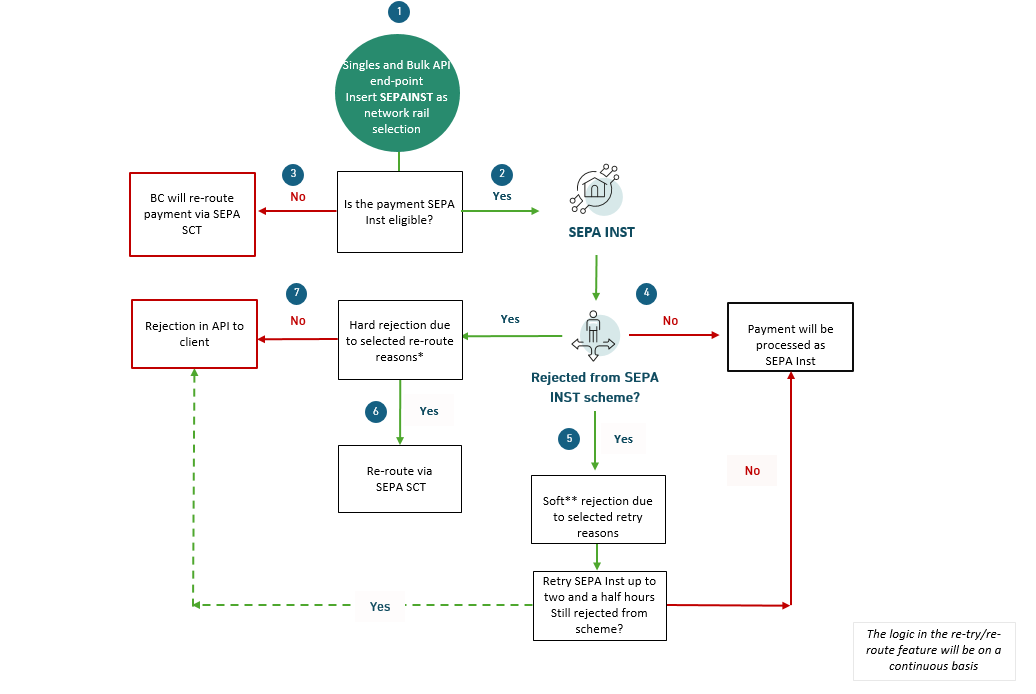
Retry and re-route automation of SEPA Instant payments
The logic that dictates when retries and rerouting occur is based on the type of error received.
Soft Rejections
These are temporary issues that may be resolved through retries, such as:
- Agent timeout
- Offline creditor bank
- Temporary system unavailability
Payments receiving soft rejections will remain in "Pending Processing" status during the retry period.
Hard Rejections
These are divided into two categories:
- Reroutable Rejections
Reroutable rejections trigger automatic rerouting to alternative rails. The rail selected for reroute is set according to your configured priorities, either through the default logic or through your specified scheme selection override or prioritized clearing networks list.
Typical reroutable rejections Include regulatory restrictions, scheme limitations, and transaction type restrictions. The following error codes trigger automatic rerouting to an alternative rail:
| Routing Reason Code | Routing Reason |
|---|---|
| AB05 | TimeoutCreditorAgent |
| AB06 | TimeoutInstructedAgent |
| AB07 | OfflineAgent |
| AB08 | OfflineCreditorAgent |
| AB09 | ErrorCreditorAgent |
| AB10 | ErrorInstructedAgent |
| AG01 | TransactionForbidden |
| AG02 | InvalidBankOperationCode |
| AG09 | PaymentNotReceived |
| AG10 | AgentSuspended |
| AG11 | CreditorAgentSuspended |
| AM02 | NotAllowedAmount |
| AM14 | AmountExceedsAgreedLimit |
| CNOR | CreditorBankIsNotRegistered |
| DNOR | DebtorBankIsNotRegistered |
| DS0G | NotAllowedPayment |
| FF01 | InvalidFileFormat |
| FF10 | BankSystemProcessingError |
| MS02 | NotSpecifiedReasonCustomerGenerated |
| MS03 | NotSpecifiedReasonAgentGenerated |
| RR01 | MissingDebtorAccountOrIdentification |
| RR02 | MissingDebtorNameOrAddress |
| RR03 | MissingCreditorsNameOrAddress |
| RR04 | RegulatoryReason |
| TM01 | InvalidCutOffTime |
- Terminal Rejections
These result in the payment being rejected back to the client without rerouting attempts. Causes include:
- Invalid or closed account number
- Blocked account
- Other fundamental beneficiary account issues
Note: For payments that cannot be processed through any available rail, you will receive a clear rejection reason to help you take appropriate action.
Tracking Rerouting and Retry events
Rerouting Events
There are two ways to track rerouting events:
Using the routingStatus property
routingStatus propertyWhen a payment is rerouted, the routingStatus property is updated with the new rail and the error code that triggered the change. This field is available in the following endpoints: GET Singles Payments, GET Payment status and GET Payment by transaction reference.
Via the payment routing notification
A PaymentRouting notification is sent whenever a payment is rerouted. The notification payload includes theroutingStatus property. For more details, see Webhooks payload examples
Important: The
routingStatusproperty is only set when a payment instructed to prefer instant routing is rerouted. Reroute notifications are triggered under the same conditions, as they simply wrap the updatedroutingStatus. In other words, this requiresSEPAINSTto be configured as theclearingNetworkor to appear first inprioritizedClearingNetworks.
Retry Events
When a payment enters a retry loop, the payment status will remain as Pending Processing until the retry period ends. If the payment retry fails, the payment will be rejected.
Rerouting in the sandbox
You can simulate a reroute event from SEPA Instant to T2 in the sandbox. Read Simulating payments for more details.
Important: Reroute notifications are only issued when a payment instructed to prefer instant routing is rerouted. This requires
SEPAINSTto be set as theclearingNetwork, or to appear first inprioritizedClearingNetworks.