
Correspondent and Agency Banking via API
Payment initiation via API from account numbers under your BIC or National Clearing Code, with FX handling and status tracking.
Overview
This section provides brief guidance on Correspondent and Agency Banking payments and highlights additional details specific to these payment types.
To send and receive data from the BC Connect API, you must be authenticated and have a valid access token. For more details on how to generate access tokens and authenticate, please see Authorisation.
You will use the fi-to-fi-customer-credit-transfer-initiation endpoint to instruct Correspondent and Agency Banking payments from your own BIC and IBANs, via us. The endpoint details, including message specifications such as property definitions, are described here: Agency and Correspondent Banking payments and Payment instruction using pacs008 format
You can also read more about the Correspondent Banking solution and Agency Banking Solution in general.
Debtor and ultimate debtor details
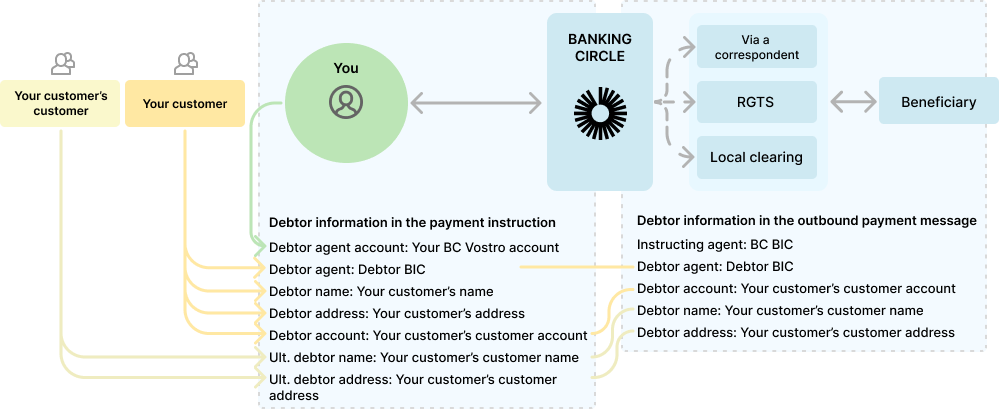
In a Correspondent Banking or Agency Banking flow, for outgoing payments, you are seen as the 'ordering institution', and your customer as the 'ordering customer'. However, depending on your agreement with us, you may be initiating payments on behalf of your customer's customer. The Correspondent Banking and Agency Banking payment initiation endpoint caters to both scenarios, by allowing you to provide:
- Debtor name and address
- Ultimate debtor name and address
Either debtor or ultimate debtor must be provided. If both are provided, the ultimate debtor details will be carried forward as the debtor name, as illustrated below:
Payment status, notifications and reports
To check the status of a payment, you can use the Get payments endpoints. You can receive notifications by subscribing to Webhooks. Furthermore, the reconciliation reports enables your reconciliation.
Compared to the other payment solutions, BC Connect supports, the Correspondent and Agency Banking payments contain an additional layer of information about the account, which you have issued to your customer, under your own BIC or National Clearing Code.
Across the Get payments and reports endpoints, we generally refer to these as the ultimateDebtorAccountor the ultimateCreditorAccount, depending on the direction of the payment.
In the table below, you will find an overview of the most common account, debtor and creditor details, and where to find those details in the reconciliation reports and the Get payments endpoints.
Payment details | Property in the | Property in the |
|---|---|---|
Debtor’s financial institution | Incoming payment: transfer.debtorAccount.financialInstitution | debtoragentBankCode |
Debtor’s account number | Incoming payment: transfer.debtorAccount | Incoming payment: debtorAccount |
Debtor’s name | Incoming payment : transfer.debtorName Outgoing payment: debtorInformation.ultimateDebtorAddress | Incoming payment: debtorLine1 |
Debtor’s address | Incoming payment: transfer.debtorAddress Outgoing payment: debtorInformation.ultimateDebtorAddress | Incoming payment: debtorLine2-4 |
Creditor’s financial institution | Incoming payment: creditorInformation.account.financialInstitution OR transfer.ultimateCreditorAccount.account.financialInstitution Outgoing payment: debtorInformation.creditorAccount.financialInstitution | beneficiaryBankCode |
Creditor’s account number | Incoming payment: transfer.ultimateCreditorAccount | Incoming payment: ultimatebeneficiaryAccount |
Creditor’s name | Incoming payment: transfer.creditorName Outgoing payment: debtorInformation.creditorName | beneficiaryLine1 |
Creditor’s address | Incoming payment: transfer.creditorAddress Outgoing payment: debtorInformation.creditorAddress | beneficiaryLine2-4 |
Your settlement (Nostro) account with us | Incoming payment: creditorInformation.account | Incoming payment: account or beneficiaryAccount |
Examples
You can find below an example mapping between the Payment Instruction and the related responses from GET Payments, Webhooks, and the Reconciliation Report:
Agency Banking via SEPA Instant
{
    "requestedExecutionDate": "2026-04-28",
     "purposeCode":"RENT",
    "CategoryPurposeCode":"EPI",
    "debtorAccount": {
        "account": "NL4089009999910133",
        "financialInstitution": "AAAANL2LXXX",
    "country": "NL"

    },
    "instrId": "Agency banking payment PRAP1",
    "debtorCountry": "DK",
    "debtorName": "Debtor Name",
    "debtorAddress": {
        "line1": "debtor Add1 CB json",
        "line2": "debtor address CB json",
        "line3": "debtor address CB json"
    },
    "ultimateDebtorName": "Ultimate debtor name",
    "ultimateDebtorAddress": {
        "line1": "Ultimate debtor add1 CB json",
        "line2": "Ultimate debtor add2 CB json",
        "line3": "Ultimate debtor add3 CB json"
    },
    "debtorAgentFinancialInstitution": "AAAANL2LXXX",
    "debtorAgentAccount": "DK4089000000021245",
    "amount": {
        "currency": "EUR",
        "amount": "1.00"
    },
    "chargeBearer": "SHA",
    "remittanceInformation": {
        "line1": "/ROC/TESTINGE2ECARRIEDFURTHERTOSCHEM3//",
        "line2": "Remittance Info2 PRAP1",
        "line3": "Remittance Info3 PRAP1",
        "line4": "Remittance Info4 PRAP1"
    },
    "creditorId": null,
    "creditorAccount": {
        "account": "CH2289000000021111123",
        "financialInstitution": null,
        "country": "CH"
    },
    "creditorName": "Creditor Beneficiary PRAP1 Name",
    "creditorAddress": {
        "line1": "Address PRAP1 1",
        "line2": "Address PRAP1 2",
        "line3": "Address PRAP1 3"
    }
}
{
    "result": [
        {
            "paymentId": "f42be9ea-4859-474d-b0d2-e5f8e89dd2a3",
            "transactionReference": "010F7272611800RT",
            "concurrencyToken": "AAAAAZfdnQs=",
            "classification": "Outgoing",
            "subClassification": "External",
            "isTraceable": true,
            "status": "Processed",
            "processedTimestamp": "2026-04-28T13:59:25.7654329+00:00",
            "latestStatusChangedTimestamp": "2026-04-28T13:59:25.7654329+00:00",
            "booked": true,
            "reversalBooked": null,
            "return": null,
            "errors": [],
            "lastChangedTimestamp": "2026-04-28T13:59:25.7654329+00:00",
            "debtorInformation": {
                "paymentBulkId": null,
                "accountId": "523bbfc0-0f3a-43a8-6e96-9aa6a65ec795",
                "account": {
                    "accountNumber": "0000021245",
                    "accountIban": "DK4089000000021245",
                    "account": "DK4089000000021245",
                    "financialInstitution": "AAAANL2LXXX",
                    "country": null
                },
                "vibanId": null,
                "viban": null,
                "instructedDate": "2026-04-28T00:00:00+00:00",
                "debitAmount": {
                    "currency": "EUR",
                    "amount": 1.00
                },
                "debitValueDate": "2026-04-28T00:00:00+00:00",
                "fxRate": null,
                "instruction": {
                    "debtorAccount": {
                        "accountNumber": "0000021245",
                        "accountIban": "DK4089000000021245",
                        "account": "DK4089000000021245",
                        "financialInstitution": "AAAANL2LXXX",
                        "country": null
                    },
                    "debtorViban": null,
                    "debtorReference": "Agency banking payment PRAP1",
                    "debtorNarrativeToSelf": null,
                    "currencyOfTransfer": "EUR",
                    "amount": {
                        "currency": "EUR",
                        "amount": 1.00
                    },
                    "requestedExecutionDate": "2026-04-28T00:00:00+00:00",
                    "chargeBearer": "Sha",
                    "remittanceInformation": {
                        "line1": "/ROC/TESTINGE2ECARRIEDFURTHERTOSCHE",
                        "line2": "M3// Remittance Info2 PRAP1",
                        "line3": "Remittance Info3 PRAP1",
                        "line4": "Remittance Info4 PRAP1"
                    },
                    "creditorId": null,
                    "creditorAccount": {
                        "accountNumber": null,
                        "accountIban": "CH2289000000021111123",
                        "account": "CH2289000000021111123",
                        "financialInstitution": "AAAACH2LXXX",
                        "country": "CH"
                    },
                    "creditorName": "Creditor Beneficiary PRAP1 Name",
                    "creditorAddress": {
                        "line1": "Address PRAP1 1",
                        "line2": "Address PRAP1 2",
                        "line3": "Address PRAP1 3"
                    },
                    "instructedChargeBearer": "SHA",
                    "clearingNetwork": null,
                    "debtorName": "Debtor Name",
                    "debtorAddress": {
                        "line1": "debtor Add1 CB json",
                        "line2": "debtor address CB json",
                        "line3": "debtor address CB json"
                    },
                    "ultimateDebtorAccount": {
                        "accountNumber": null,
                        "accountIban": "NL4089009999910133",
                        "account": "NL4089009999910133",
                        "financialInstitution": "AAAANL2LXXX",
                        "country": "NL"
                    },
                    "ultimateDebtorName": "Ultimate debtor name",
                    "ultimateDebtorAddress": {
                        "line1": "Ultimate debtor add1 CB json",
                        "line2": "Ultimate debtor add2 CB json",
                        "line3": "Ultimate debtor add3 CB json"
                    },
                    "clientCustomerId": null
                }
            },
            "creditorInformation": null,
            "statusReasons": null,
            "purposeCode": "RENT",
            "categoryPurposeCode": "EPI",
            "possibleActions": [
                "Recall"
            ]
        }
    ],
    "pageInfo": {
        "currentPage": 1,
        "pageSize": 50
    }
}
        {
            "pIdChannelUser": "[email protected]",
            "pTxnDate": "2026-04-28T00:00:00+00:00",
            "reportDate": "2026-05-01T00:00:00+00:00",
            "customerId": "000011111",
            "account": "DK4089000000021245",
            "accountCurrency": "EUR",
            "debitAmount": 1.00,
            "creditAmount": null,
            "valueDate": "2026-04-28T00:00:00+00:00",
            "instructedAmount": 1.00,
            "instructedAmountCurrency": "EUR",
            "transactionAmount": 1.00,
            "transactionAmountCurrency": "EUR",
            "exchangeRate": 1.0,
            "debtorBankCode": "AAAACH2LXXX",
            "debtorAccount": "DK4089000000021245",
            "debtorLine1": "",
            "debtorLine2": "",
            "debtorLine3": "",
            "debtorLine4": "",
            "beneficiaryBankCode": "AAAACH2LXXX",
            "beneficiaryAccount": "CH2289000000021111123",
            "beneficiaryLine1": "Creditor Beneficiary PRAP1 Name",
            "beneficiaryLine2": "Address PRAP1 1",
            "beneficiaryLine3": "Address PRAP1 2",
            "beneficiaryLine4": "Address PRAP1 3",
            "paymentReferenceNumber": "010F7272611800RT",
            "fileReferenceNumber": "",
            "userReferenceNumber": "Agency banking payment PRAP1",
            "paymentDetails1": "/ROC/TESTINGE2ECARRIEDFURTHERTOSCHE",
            "paymentDetails2": "M3// Remittance Info2 PRAP1",
            "paymentDetails3": "Remittance Info3 PRAP1",
            "paymentDetails4": "Remittance Info4 PRAP1",
            "creditDebitIndicator": "DBIT",
            "bankTrnsCodeDomain": "PMNT",
            "bankTrnsCodeFamily": "ICDT",
            "paymentId": "f42be9ea-4859-474d-b0d2-e5f8e89dd2a3",
            "lastChangedTimestamp": "2026-04-28T13:59:25.7654329+00:00",
            "createdAt": "2026-04-28T13:59:35.8601933+00:00",
            "debtorAgentBankCode": "AAAACH2LXXX",
            "ultimateDebtorLine1": "Ultimate debtor name",
            "ultimateDebtorLine2": "Ultimate debtor add1 CB json",
            "ultimateDebtorLine3": "Ultimate debtor add2 CB json",
            "ultimateDebtorLine4": "Ultimate debtor add3 CB json",
            "ultimateDebtorAccount": "NL4089009999910133",
            "statusReasonCode": "",
            "statusReasonDescription": "",
            "bankTrnsCodeSubFamily": "",
            "ultimateBeneficiaryAccount": "",
            "additionalRemittanceInformation1": "",
            "additionalRemittanceInformation2": "",
            "additionalRemittanceInformation3": "",
            "additionalRemittanceInformation4": "",
            "additionalRemittanceInformation5": "",
            "instructedChargeBearer": "SHA",
            "chargeBearer": "SHA",
            "paymentRail": null,
            "purposeCode": "RENT",
            "categoryPurposeCode": "EPI"
        }
Sending Payment with FX
Correspondent Banking solution allows you to send and receive payments in up to 24 currencies with a single currency nostro account of your choice.
Outbound payments can include FX conversion using one of the following methods, combining BC Connect’s Correspondent Banking and FX capabilities.
Embedded FX (live rate)
Trigger FX directly in the payment instruction via the API by populating currencyOfTransfer. If currencyOfTransfer differs from the currency in amount, the system performs the FX conversion automatically using the live rate at the time of processing.
Request for Quote (RFQ)
Obtain an FX quote prior to payment initiation using the RFQ endpoint. The returned rate is locked for 30 seconds. Include the fxQuoteID in your payment instruction to execute the payment using the quoted rate.
Held Rate
Use a guaranteed FX rate obtained through the Held rate feature. For more details on Held Rates and the steps to follow, see Held rates.