
Sending and receiving payments via Swift
Our Correspondent Banking solution enables you to receive and send payments on behalf of your customers.
Effective November 2026, unstructured addresses will no longer be supported. All address data must be provided in either structured or hybrid format.
Receiving payments
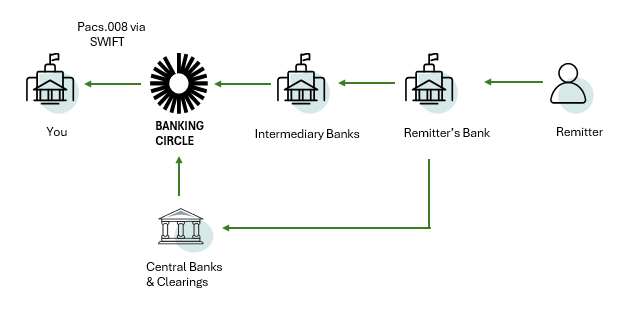
For your clients to receive payments via our Correspondent Banking solution, they should provide the account details you have given to them to their buyer or remitter. We will receive the payment either directly through a clearing system or via our partner network from the remitting bank.
Following SWIFT’s migration to ISO 20022, we will automatically generate a pacs.008 message for onward transmission to you via SWIFT (replacing the previous MT103 message format).
- We will receive the payment from the remitter's bank and automatically generate a pacs.008 message for onward transmission to you via SWIFT (replacing the previous MT103 format).
- Your underlying client's account number will be quoted as the beneficiary account, and your underlying client as the beneficiary
- The payment will be settled on your settlement (Nostro) account with us
- If the instructed currency and the account currency differ, we will convert it automatically when crediting your account, with live rate plus pre-agreed margin
- MT910 can be configured to be sent to you if required
Pacs.008 specifications
The following specifies the mandatory pacs.008 fields required for successful processing of messages received from your counterparty.
Field / Requirement | Details |
|---|---|
Debtor Account | The account number issued by the counterparty, to be sent as debtor account to your customer:
Must be an IBAN or account number. If not an IBAN, include the BIC or NCC under which the account number was issued. |
Debtor Agent | BIC of the counterparty FI (Debtor Agent):
|
Debtor | Name and address as the payer- Maximum 35 length, text type Address requirements (Structured/Hybrid model)
(Fully unstructured address - AdrLine only, will be phased out.) |
Creditor Agent | Your BIC |
Creditor | Your customers name and address as Payee -Maximum 35 length, text type Address requirements (Structured/Hybrid model)
(Fully unstructured address - AdrLine only, will be phased out.) |
Creditor Account | Your Client IBAN or Account, issues by you |
Settlement Account | Not Applicable |
Examples
We expect to receive the pacs.008 or MT103 in the following format for STP processing:
<Document xmlns="urn:iso:std:iso:20022:tech:xsd:pacs.008.001.08" xmlns:xsi="http://www.w3.org/2001/XMLSchema-instance">
	<FIToFICstmrCdtTrf>
		<GrpHdr>
			<MsgId>SAMPLEMSGID001</MsgId>
			<CreDtTm>2025-05-31T00:00:00+00:00</CreDtTm>
			<NbOfTxs>1</NbOfTxs>
			<SttlmInf>
				<SttlmMtd>INDA</SttlmMtd>
			</SttlmInf>
		</GrpHdr>
		<CdtTrfTxInf>
			<PmtId>
				<InstrId>SAMPLEINSTRID001</InstrId>
				<EndToEndId>SAMPLEE2EID001</EndToEndId>
				<UETR>a3f1b5c7-9e2d-4d89-a3e6-74f1b9f62c30</UETR>
			</PmtId>
			<IntrBkSttlmAmt Ccy="EUR">100</IntrBkSttlmAmt>
			<IntrBkSttlmDt>2025-09-12</IntrBkSttlmDt>
			<InstdAmt Ccy="EUR">100</InstdAmt>
			<ChrgBr>SHAR</ChrgBr>
			<Dbtr>
				<!--Name and address of the payer -->
				<Nm>Ordering Customer Name</Nm>
				<PstlAdr>
					<TwnNm>Copenhagen</TwnNm>
  				<Ctry>DK</Ctry>
  				<AdrLine>Line 1</AdrLine>
  				<AdrLine>Line 2</AdrLine>
				</PstlAdr>
			</Dbtr>
			<DbtrAcct>
				<Id>
					<IBAN>DK4089009999910133</IBAN>
					<!--account number issued by the counterparty-->
				</Id>
			</DbtrAcct>
			<DbtrAgt>
				<!--BIC of the counterparty FI-->
				<FinInstnId>
					<BICFI>AAAAGB2LXXX</BICFI>
				</FinInstnId>
			</DbtrAgt>
			<CdtrAgt>
				<!--Your BIC-->
				<FinInstnId>
					<BICFI>BBBBCH2LXXX</BICFI>
				</FinInstnId>
			</CdtrAgt>
			<Cdtr><!--Your customers name and address-->
				<Nm>Customer Name</Nm>
				<PstlAdr>
					  <TwnNm>Zurich</TwnNm>
  					<Ctry>CH</Ctry>
  					<AdrLine>Line 1</AdrLine>
  					<AdrLine>Line 2</AdrLine>
				</PstlAdr>
			</Cdtr>
			<CdtrAcct>
				<!--Your Client IBAN, issued by you-->
				<Id>
					<IBAN>DK2289000000021111</IBAN>
				</Id>
			</CdtrAcct>
			<RmtInf>
				<Ustrd>TEST1</Ustrd>
			</RmtInf>
		</CdtTrfTxInf>
	</FIToFICstmrCdtTrf>
</Document>
:20: Your Transaction Reference
:23B:CRED
:32A:250115USD1,01
:33B:USD1,01
:50K:/Debtor Iban
Debtor Name
Debtor Address
:52A:Debtor BIC
:57A: Your BIC
:59:/Your Client IBAN, issued by you
Beneficiary name
:70:Remittance information
:71A:SHASending payments
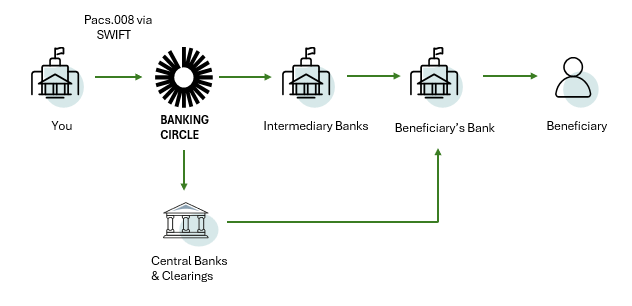
To instruct a Correspondent Banking payment, you should send a pacs.008 or MT103 message containing your client's IBAN/BBAN held with yourselves to be shown in the remitting account field. Following receipt of this message, our system will automatically settle the payment on your Nostro with us and forward the payment instruction to the respective clearing and settlement system.
For outgoing payments, here’s how we handle your instructions:
Following SWIFT’s migration to ISO 20022, we now receive your payment as a pacs.008 message, replacing the previous MT103 format.
- Process and settle the payment on your Nostro settlement account with us
- Send a pacs.008 towards the beneficiary bank, through our direct clearing accesses or our network of correspondent banks
- You can make the payment in a currency, different from your account currency, and it can be done by indicating a currency conversion in the payment instruction
- You can receive a MT900, if required
Your payment details are carried all the way through the payment chain:
- Your underlying client's account number will be quoted as the remitter account, and your underlying client as the remitter
- Your BIC will be quoted as the Debtor Agent BIC in pacs.008 or ordering institution, in field 52
Pacs.008 specifications
The following specifies the mandatory pacs.008 fields required for successful processing of messages from you.
Field / Requirement | Details |
|---|---|
Debtor Account | The account number issued by you to your customer, to be sent as debtor account to creditor:
Must be an IBAN or account number. If not an IBAN, include the BIC or NCC under which the account number was issued. |
Debtor Agent | Your BIC
|
Debtor | Your customer’s name and address as the payer- Maximum 35 length, text type Address requirements (Structured/Hybrid model)
(Fully unstructured address - AdrLine only, will be phased out.) |
Creditor Agent | The beneficiary bank’s BIC or Clearing Code
|
Creditor | Name and address as Payee - Maximum 35 length, text type. Address requirements (Structured/Hybrid model)
(Fully unstructured address - AdrLine only, will be phased out.) |
Creditor Account | Bank account number of the beneficiary.
|
Settlement Account | Used to specify the settlement account. |
MT103 specifications
Below you can find an overview of the MT103 message that we will expect to receive from you, when you are instructing a payment in a currency of one of your Nostro accounts:
| Payment details | Comment | MT103 field | Mandatory/ Optional | Example |
|---|---|---|---|---|
| Sender’s reference | Reference to identify the payment between you and us. | 20 | M | :20:1332ZZ12386 |
| Bank operation code | SWIFT standard 4!c bank operation code. | 23B | M | 23B:CRED |
| Payment amount | The amount which will be debited from your settlement account. | 32A | M | :32A: 230123GBP8 |
| Payment currency | The currency of the payment: You must have a settlement account in the specified currency, otherwise the payment will be rejected. | 32A | M | :32A: 230123GBP8 |
| Value date | Represents the requested value date. Only current or future dates are accepted. If the payment instruction is submitted after cut-off, the value date should be set to next business day. | 32A | M | :32A:230123GBP8 |
| Payment amount and currency | Optional field. In case of currency conversion, this is where you specify currency and amount converted according to exchange rate specified in F36 | 33B | O | :32B:GBP8 |
| Exchange Rate | Exchange Rate used in F33B to convert amount from F32A | 36 | O | :36:A |
| Remitter’s account | Use line 1 of field 50K for your customer’s account IBAN. | 50K | M | 50K:/Your customer’s |
| Remitter’s name | Use line 2 of field 50K for your customer’s name. | 50K | M | Your customer’s name |
| Remitter’s address | Use line 3-5 of field 50K for your customer’s address. Only line 3 is mandatory. | 50K | M | Your customer’s Address |
| Ordering institution | Optional field. If not populated, we will quote your BIC in the outbound payment message. | 52A | O | :52A: Your BIC Code |
| Sender's correspondent | Use this field to specify the settlement account. If you have more than one settlement account in the same currency. If this field does not contain a valid settlement account in line 1, it will lead to an exception/non-STP*. | 53B | O/M | :53B:/Your BC nostro IBAN and (optionally) your BIC |
| Account with institution | The beneficiary bank’s BIC. Only BICs or valid clearing codes (//SC or //FW) are accepted. Only 1 line is accepted. | 57A or 57C | M | :57A:CELLLULL or :57C://SC609104 |
| Beneficiary’s account | Bank account number of the beneficiary. Must be an international account number, when field 57A contains a BIC code or a domestic account number, when field 57C contains a clearing code. | 59 | M | :59:/Account number |
| Beneficiary’s name | Use line 2 of field 59 for the name of the beneficiary. | 59 | M | Name |
| Beneficiary’s address | Use line 3-5 of field 59 for the address of the beneficiary. | 59 | O | Street/Number City/Zip Code Country |
| Remittance information | This field can contain up to 4 lines. | 70 | O | :70:Free Text |
| Details of charges | Specifies which party will bear the charges for the transaction. | 71A | M | :71A:SHA |
| Sender’s charges | Mandatory if field 71A specifies “BEN”. Not allowed, if field 71A specifies “OUR”. If populated, we will carry the content forward. | 71F | O/M | :71F:GBP1,00 |
| Receiver’s charges | Not allowed, if field 71A specifies “SHA”. If populated, we will carry the content forward. | 71G | O | :71G:GBP1,00 |
| Sender to receiver information | This field can contain up to 6 lines. We will carry the content forward. If populated, it must follow SWIFT usage rules. | 72 | O | :72:/ACC/Free Text |
| Regulatory reporting | This field can contain up to 3 lines. We will carry the content forward. If populated, it must follow SWIFT usage rules. | 77B | O | :77B:/ORDERRES/LU// Free text |
*STP: Straight-Through-Processing, i.e. processing that does not require manual handling.
Fields 33 and 36 in the table above are only applicable for clients who intend to use the Correspondent Banking solution with FX.
Examples
We expect to receive the pacs.008 or MT103 in the following format for STP processing:
<Document xmlns="urn:iso:std:iso:20022:tech:xsd:pacs.008.001.08" xmlns:xsi="http://www.w3.org/2001/XMLSchema-instance">
	<FIToFICstmrCdtTrf>
		<GrpHdr>
			<MsgId>SAMPLEMSGID001</MsgId>
			<CreDtTm>2025-05-31T00:00:00+00:00</CreDtTm>
			<NbOfTxs>1</NbOfTxs>
			<SttlmInf>
				<SttlmMtd>INDA</SttlmMtd>
				<SttlmAcct>
					<Id>
						<IBAN>DK4089000000021245</IBAN>
						<!--When sending payments, use this field if you have more than one settlement account in the same currency-->
					</Id>
				</SttlmAcct>
			</SttlmInf>
		</GrpHdr>
		<CdtTrfTxInf>
			<PmtId>
				<InstrId>SAMPLEINSTRID001</InstrId>
				<EndToEndId>SAMPLEE2EID001</EndToEndId>
				<UETR>a3f1b5c7-9e2d-4d89-a3e6-74f1b9f62c30</UETR>
			</PmtId>
			<IntrBkSttlmAmt Ccy="EUR">100</IntrBkSttlmAmt>
			<IntrBkSttlmDt>2025-09-12</IntrBkSttlmDt>
			<InstdAmt Ccy="EUR">100</InstdAmt>
			<ChrgBr>SHAR</ChrgBr>
			<Dbtr>
				<!--Your customer’s name and address -->
				<Nm>Ordering Customer Name</Nm>
				<PstlAdr>
						<TwnNm>Copenhagen</TwnNm>
  					<Ctry>DK</Ctry>
  					<AdrLine>Line 1</AdrLine>
  					<AdrLine>Line 2</AdrLine>
				</PstlAdr>
			</Dbtr>
			<DbtrAcct>
				<Id>
					<IBAN>DK4089009999910133</IBAN>
					<!--account number issued by you to your customer-->
				</Id>
			</DbtrAcct>
			<DbtrAgt>
				<!--your BIC-->
				<FinInstnId>
					<BICFI>AAAAGB2LXXX</BICFI>
				</FinInstnId>
			</DbtrAgt>
			<CdtrAgt>
				<!-- Beneficiary bank’s BIC or Clearing Code-->
				<FinInstnId>
					<BICFI>BBBBCH2LXXX</BICFI>
				</FinInstnId>
			</CdtrAgt>
			<Cdtr>
				<Nm>Customer Name</Nm>
				<PstlAdr>
						<TwnNm>Zurich</TwnNm>
  					<Ctry>CH</Ctry>
  					<AdrLine>Line 1</AdrLine>
  					<AdrLine>Line 2</AdrLine>
				</PstlAdr>
			</Cdtr>
			<CdtrAcct>
				<!--IBAN or BBAN of the beneficiary-->
				<Id>
					<IBAN>DK2289000000021111</IBAN>
				</Id>
			</CdtrAcct>
			<RmtInf>
				<Ustrd>TEST1</Ustrd>
			</RmtInf>
		</CdtTrfTxInf>
	</FIToFICstmrCdtTrf>
</Document>
20: Your Transaction Reference
:23B:CRED
:32A: 250115USD1,01
:33B: USD1,01
:50K:/Your Client IBAN
Debtor Name
Debtor Address
:53B:/Your Nostro Account with Banking Circle
:57A: Beneficiary BIC
:59:/Beneficiary IBAN or Account
Beneficiary Name
:70: Remittance info
:71A:SHASpecifications with FX
In pacs.008, the elements<InstdAmt> (Instructed Amount) and XchgRate (Exchange Rate) are used when a payment involves FX conversion and map to MT103 Fields 33B and 36 respectively.
Although these elements may be optional in the general ISO 20022 specification, they must be populated when initiating a Correspondent Banking payment with embedded FX. Please find below further guidance to instruct such payment:
Interbank Settlement Amount (Equivalent to MT103 field 32A)
This field is mandatory for straight-through payment processing.
- If the outgoing amount is known (e.g., you have an invoice in a foreign currency), the value should be populated accurately; otherwise you can provide an indicative value in this field.
- If field
InstdAmtis populated, the value ofIntrBkSttlmAmtmay be overridden, as the value ofInstdAmtwill be the definitive value, and the amount inIntrBkSttlmAmtwill be adjusted based on the actual FX rate used.
Instructed Amount (Equivalent to MT103 field 33B)
This is the amount and currency instructed by the ordering customer. You must enter a value to successfully initiate a Correspondent Banking payment with embedded FX.
- If you want to specify the amount that will be sent out (e.g., you are paying an invoice in a foreign currency), the
InstdAmtshould match withIntrBkSttlmAmt. - If the intention is instead to control the amount debited from the sender's Nostro account , the
InstdAmtandIntrBkSttlmAmtmay differ, and the value entered in fieldInstdAmtwill be taken as the defining value, whereby fieldIntrBkSttlmAmtwill be adjusted according to fieldInstdAmt.
Exchange Rate (Equivalent to MT103 field 36)
When fields 32 and 33 are populated with different currencies, it is mandatory to populate field 36 with an indicative FX rate, but this field will be overridden by the actual FX rate, when the payment is effectively executed.
- When the currency of
InstdAmtdiffers from the currency ofIntrBkSttlmAmt, an indicative exchangeXchgRaterate must be provided. - This value represents the expected FX conversion rate, but it may be overridden by the actual FX rate applied at execution time.
Examples
Specify the exact amount to be sent
Below is an example of you instructing a USD payment from your EUR Nostro account, in the scenario where you want to specify exactly which amount will be sent out:
Your Nostro account in EUR will be debited by the converted USD amount present in InstdAmt or field 33 at the time the
payment settles.
<Document xmlns="urn:iso:std:iso:20022:tech:xsd:pacs.008.001.08" xmlns:xsi="http://www.w3.org/2001/XMLSchema-instance">
	<FIToFICstmrCdtTrf>
		<GrpHdr>
			<MsgId>SAMPLEMSGID001</MsgId>
			<CreDtTm>2025-05-31T00:00:00+00:00</CreDtTm>
			<NbOfTxs>1</NbOfTxs>
			<SttlmInf>
				<SttlmMtd>INDA</SttlmMtd>
				<SttlmAcct>
					<Id>
						<IBAN>DK4089000000021245</IBAN>
						<!--Your Nostro Account with us in EUR,When sending payments, use this field if you have more than one settlement account in the same currency-->
					</Id>
				</SttlmAcct>
			</SttlmInf>
		</GrpHdr>
		<CdtTrfTxInf>
			<PmtId>
				<InstrId>SAMPLEINSTRID001</InstrId>
				<EndToEndId>SAMPLEE2EID001</EndToEndId>
				<UETR>a3f1b5c7-9e2d-4d89-a3e6-74f1b9f62c30</UETR>
			</PmtId>
			<IntrBkSttlmAmt Ccy="USD">1.01</IntrBkSttlmAmt>
			<IntrBkSttlmDt>2025-09-12</IntrBkSttlmDt>
			<InstdAmt Ccy="USD">1.01</InstdAmt>
			<ChrgBr>SHAR</ChrgBr>
			<Dbtr>
				<!--Your customer’s name and address -->
				<Nm>Ordering Customer Name</Nm>
				<PstlAdr>
						<TwnNm>Copenhagen</TwnNm>
  					<Ctry>DK</Ctry>
  					<AdrLine>Line 1</AdrLine>
  					<AdrLine>Line 2</AdrLine>
				</PstlAdr>
			</Dbtr>
			<DbtrAcct>
				<Id>
					<IBAN>DK4089009999910133</IBAN>
					<!--account number issued by you to your customer-->
				</Id>
			</DbtrAcct>
			<DbtrAgt>
				<!--your BIC-->
				<FinInstnId>
					<BICFI>AAAAGB2LXXX</BICFI>
				</FinInstnId>
			</DbtrAgt>
			<CdtrAgt>
				<!-- Beneficiary bank’s BIC or Clearing Code-->
				<FinInstnId>
					<BICFI>BBBBCH2LXXX</BICFI>
				</FinInstnId>
			</CdtrAgt>
			<Cdtr>
				<Nm>Customer Name</Nm>
				<PstlAdr>
						<TwnNm>Zurich</TwnNm>
  					<Ctry>CH</Ctry>
  					<AdrLine>Line 1</AdrLine>
  					<AdrLine>Line 2</AdrLine>
				</PstlAdr>
			</Cdtr>
			<CdtrAcct>
				<!--IBAN or BBAN of the beneficiary-->
				<Id>
					<IBAN>DK2289000000021111</IBAN>
				</Id>
			</CdtrAcct>
			<RmtInf>
				<Ustrd>TEST1</Ustrd>
			</RmtInf>
		</CdtTrfTxInf>
	</FIToFICstmrCdtTrf>
</Document>
20: Your Transaction Reference
:23B:CRED
:32A:250115USD1,01
:33B:USD1,01
:50K:/Your Client IBAN
Debtor Name
Debtor Address
:53B:/Your Nostro Account with us in EUR
:57A: Beneficiary BIC
:59:/Beneficiary IBAN
Beneficiary Name
:70: Remittance info
:71A:SHASpecify the exact EUR amount to be debited
Here is an example of initiating a USD payment from your EUR Nostro account, where you want to define the exact EUR amount to be debited:
Your EUR Nostro account will be debited by the EUR amount present in InstdAmt or field 33, and the USD amount sent
out will depend on the actual FX rate, when the payment is effectively executed.
<Document xmlns="urn:iso:std:iso:20022:tech:xsd:pacs.008.001.08" xmlns:xsi="http://www.w3.org/2001/XMLSchema-instance">
	<FIToFICstmrCdtTrf>
		<GrpHdr>
			<MsgId>SAMPLEMSGID001</MsgId>
			<CreDtTm>2025-05-31T00:00:00+00:00</CreDtTm>
			<NbOfTxs>1</NbOfTxs>
			<SttlmInf>
				<SttlmMtd>INDA</SttlmMtd>
				<SttlmAcct>
					<Id>
						<IBAN>DK4089000000021245</IBAN>
						<!--Your Nostro Account with us in EUR,When sending payments, use this field if you have more than one settlement account in the same currency-->
					</Id>
				</SttlmAcct>
			</SttlmInf>
		</GrpHdr>
		<CdtTrfTxInf>
			<PmtId>
				<InstrId>SAMPLEINSTRID001</InstrId>
				<EndToEndId>SAMPLEE2EID001</EndToEndId>
				<UETR>a3f1b5c7-9e2d-4d89-a3e6-74f1b9f62c30</UETR>
			</PmtId>
			<IntrBkSttlmAmt Ccy="USD">1040</IntrBkSttlmAmt>
			<IntrBkSttlmDt>2025-09-12</IntrBkSttlmDt>
      <InstdAmt Ccy="EUR">1050</InstdAmt>
      <XchgRate>1.5</XchgRate>
			<ChrgBr>SHAR</ChrgBr>
			<Dbtr>
				<!--Your customer’s name and address -->
				<Nm>Ordering Customer Name</Nm>
				<PstlAdr>
						<TwnNm>Copenhagen</TwnNm>
  					<Ctry>DK</Ctry>
  					<AdrLine>Line 1</AdrLine>
  					<AdrLine>Line 2</AdrLine>
				</PstlAdr>
			</Dbtr>
			<DbtrAcct>
				<Id>
					<IBAN>DK4089009999910133</IBAN>
					<!--account number issued by you to your customer-->
				</Id>
			</DbtrAcct>
			<DbtrAgt>
				<!--your BIC-->
				<FinInstnId>
					<BICFI>AAAAGB2LXXX</BICFI>
				</FinInstnId>
			</DbtrAgt>
			<CdtrAgt>
				<!-- Beneficiary bank’s BIC or Clearing Code-->
				<FinInstnId>
					<BICFI>BBBBCY2LXXX</BICFI>
				</FinInstnId>
			</CdtrAgt>
			<Cdtr>
				<Nm>Customer Name</Nm>
				<PstlAdr>
						<TwnNm>Zurich</TwnNm>
  					<Ctry>CH</Ctry>
  					<AdrLine>Line 1</AdrLine>
  					<AdrLine>Line 2</AdrLine>
				</PstlAdr>
			</Cdtr>
			<CdtrAcct>
				<!--IBAN or BBAN of the beneficiary-->
				<Id>
					<IBAN>DK2289000000021111</IBAN>
				</Id>
			</CdtrAcct>
			<RmtInf>
				<Ustrd>TEST1</Ustrd>
			</RmtInf>
		</CdtTrfTxInf>
	</FIToFICstmrCdtTrf>
</Document>
20: Your Transaction Reference
:23B:CRED
:32A:250115USD1040
:33B:EUR1050
:36:1,5
:50K:/Your Client IBAN
Debtor Name
Debtor Address
:53B:/Your Nostro Account with us in EUR
:57A: Beneficiary BIC
:59:/Beneficiary IBAN
Beneficiary Name
:70: Remittance info
:71A:SHANon-STP Scenarios and Rejection Cases
To maximise the success of both your implementation and payment processing for correspondent banking via Swift, follow the guidelines below to ensure your payments are processed automatically, without manual handling.
- Missing Funding Before initiating a payment, make sure your account has enough available funds. If funds are insufficient, the payment will be pending, and you will receive an MT199 message with error code
AM04. If still not funded by the next business day, it will be rejected, with an MT199 message with error codeXA01. - F54 / F55 or PACS.008 equivalents Populating
InstdRmbrsmntAgtand /orThrdRmbrsmntAgt(i.e fields 54 and/or 55 respectively from MT103) will trigger non-STP flows and may require manual handling. - Multi-currency payments Unless performing an FX transaction, ensure that the currencies
InstdAmtandIntrBkSttlmAmtfrom pacs.008 (or in F32 and F33 from MT103) match. - Requested execution date outside limit This occurs when the execution date is set to T0, but the payment is submitted after the cut-off time for the selected currency. Make sure to submit payments well before the cut-off time. Read more about cut-off time.
- Other deviations Any deviation from above might lead to manual intervention and processing delay.
If any other pacs.008 or MT103 fields, than the ones mentioned above, are populated, the payment will be processed, however the other tags will be ignored and not carried forward to the outbound payment message.
If the pacs.008 or MT103 does not follow the above specifications, the payment will require manual intervention, which will lead to an increased processing time.